Bring invoices together.
Forward supplier emails or upload documents. Keep the source invoice alongside the information your team needs to process it.

ARROWBILL + QUICKBOOKS ONLINE
Give your UK finance team one place to capture invoices, check VAT and collect approvals.
ArrowBill’s AP automation sends reviewed bills and supporting documents to QuickBooks Online.
Our customers



ACCOUNTS PAYABLE, FROM START TO POSTING
For UK teams using QuickBooks Online, ArrowBill brings supplier invoices, VAT checks and approval decisions into one place. Your finance team reviews the details before they reach the ledger.
Forward invoice emails or upload PDFs and images. Extract supplier details, dates, amounts and line items for review.
Invoice details capturedCheck the invoice against your QuickBooks vendor, expense accounts and available tax codes. Correct discrepancies before publishing.
Accounting details checkedOn Team, match purchase orders held in ArrowBill and route invoices to the people who need to approve them.
Approval recorded · TeamCreate the supplier bill with its reviewed coding and source attachment. Payments and bank reconciliation stay in your existing process.
Bill and document sentA SHARED HOME FOR ACCOUNTS PAYABLE
Move supplier invoices out of scattered email threads and into ArrowBill. Give your UK finance team one workspace to manage the work before it reaches QuickBooks Online.
Start 14 day free trial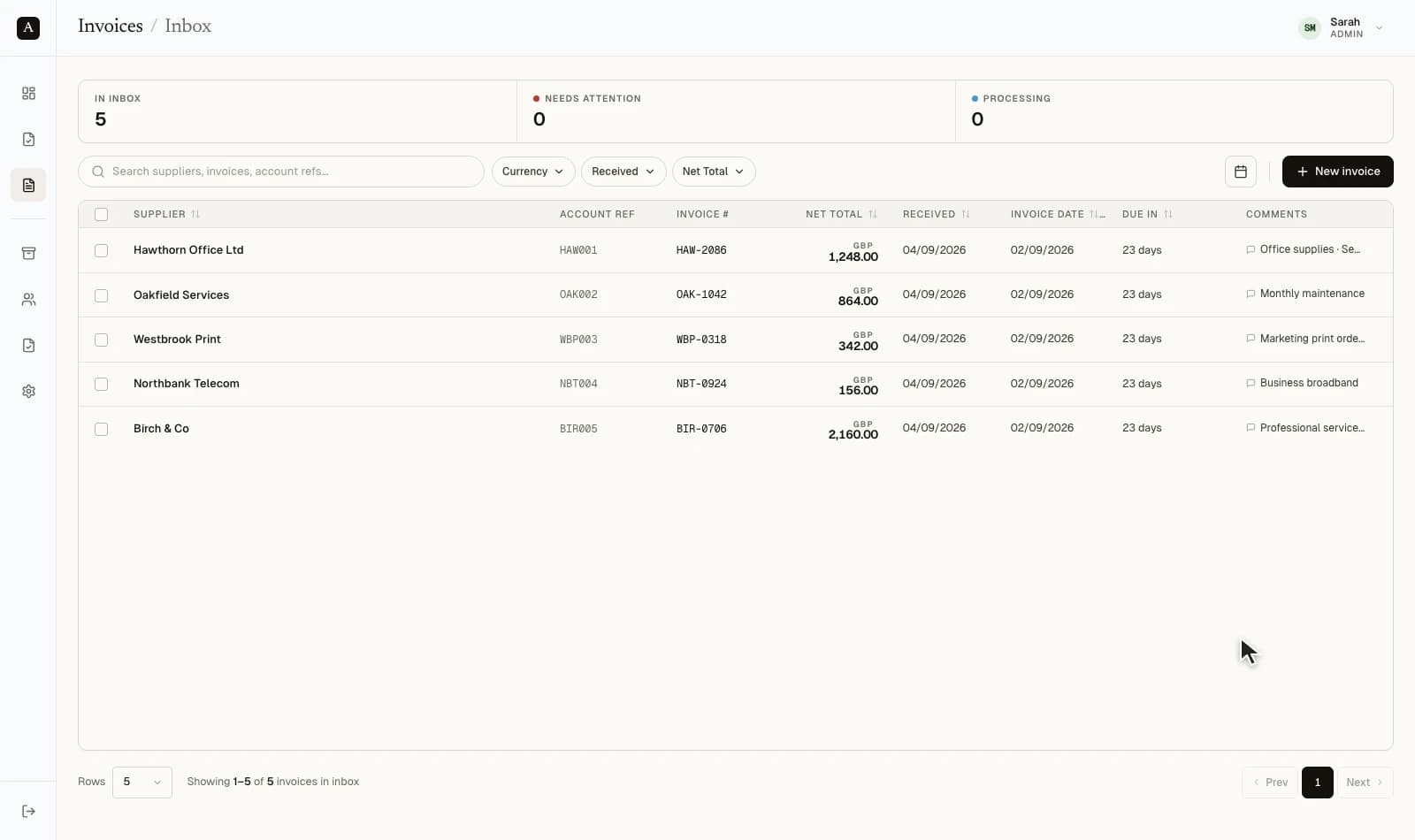
Forward supplier emails or upload documents. Keep the source invoice alongside the information your team needs to process it.
Follow invoices through review, approval and publishing. On Team, approvers can add comments and record decisions in the same workspace.
BILL APPROVAL, BEFORE BILL CREATION
Bring the people who know the purchase into the review. Keep finance in control of what gets published.
Explore the Team planRoute invoices to your approvers in ArrowBill. They can review the source, add comments and record a decision without a QuickBooks login.
Use two-way matching against purchase orders held in ArrowBill. Review quantity and value differences before creating the supplier bill.
Keep approval decisions, comments and exceptions with the invoice in ArrowBill. Send the reviewed accounting data and selected document to QuickBooks.
Approval workflows and two-way PO matching are Team features.
WHERE ARROWBILL FITS
QuickBooks has its own automation. ArrowBill gives teams a dedicated place to prepare supplier bills before they enter the ledger.
Already using QuickBooks Online Advanced workflows? Review how your existing rules apply to bills created by connected apps. ArrowBill approval does not bypass those rules. Read Intuit’s workflow guidance
WHEN SOMETHING NEEDS ATTENTION
Keep a rejected bill separate from a missing attachment. Understand what QuickBooks accepted and what your team needs to correct.
A missing vendor, inactive account or incompatible tax code can stop a bill. Review the reported issue, refresh the relevant QuickBooks list and correct the invoice before trying again.
If the bill is accepted but the document upload fails, the bill result remains visible. Address the attachment issue with the existing bill in mind.
YOUR FIRST CONNECTED COMPANY
Use the trial to test the entire journey with your own vendors, coding and approval process.
Authorise your QuickBooks Online company and sync its vendors, accounts and tax codes.
Upload or email a supplier document. Check the extracted details and complete the required approvals.
Publish the bill. Check the vendor, coded lines and source attachment in your connected QuickBooks company.
Individual processing on Solo.
Approval workflows and PO matching on Team.
BEFORE YOU CONNECT
Bill entry, approval settings, attachments and the boundaries of the integration.
Ask us about your setupConnect ArrowBill to your QuickBooks company, sync vendors, accounts and tax codes, then forward or upload supplier invoices. ArrowBill extracts the details for review. Once the required checks and approvals are complete, publish a coded supplier bill and its selected source attachment to QuickBooks Online.
QuickBooks has native bill automation features, and QuickBooks Online Advanced offers approval workflows. Availability depends on your account and region. ArrowBill adds a separate workspace for invoice capture, coding checks, purchase order review and team approvals before bill creation. Any approval rules configured within QuickBooks may still apply to bills created by the integration.
It creates a supplier bill in accounts payable, with the reviewed vendor, invoice reference, dates, currency and account-coded lines. It does not create a paid expense, customer sales invoice or bank payment. Approval in ArrowBill does not override approval settings in QuickBooks.
You can email or upload supported PDF and image invoices to ArrowBill. The extracted header and line-item data can be reviewed before publishing to QuickBooks. The selected original document is uploaded as an attachment after the bill is created.
Yes. On the ArrowBill Team plan, invited approvers review invoices and record decisions inside ArrowBill. They do not need a QuickBooks login for that review. Your finance team controls the connection and bill publishing.
The ArrowBill Team plan includes two-way purchase order matching. Review invoice lines against the purchase orders held in ArrowBill and resolve differences before publishing. Purchase order review stays in ArrowBill; the connector creates an account-coded supplier bill in QuickBooks.
ArrowBill checks the invoice currency against the vendor and company settings. Where the bill currency differs from the home currency, QuickBooks multicurrency must be enabled, the vendor must be compatible and a usable exchange rate must be available. Resolve currency conflicts before publishing.
A rejected bill shows a publishing error so your team can correct the vendor, account, tax or currency issue. Bill creation and attachment upload are separate: if the bill succeeds but its document does not, ArrowBill shows an attachment warning so you can address the document issue without treating the bill as uncreated.
This integration is for QuickBooks Online. It connects to a QuickBooks Online company through Intuit authorisation; it is not a QuickBooks Desktop connector.
Choose Solo for individual invoice processing or Team when you need approval workflows and two-way purchase order matching. Pricing depends on invoice volume. Both offer a 14-day free trial with no credit card; the pricing page shows current allowances and plan details.
No. ArrowBill prepares, reviews and publishes supplier bills. Vendor payments, bank reconciliation and financial reporting stay in QuickBooks Online or your existing payment service.
MAKE LIGHTER WORK OF YOUR NEXT BILL
QuickBooks and QuickBooks Online are trademarks of Intuit Inc. ArrowBill is an independent product and is not affiliated with or endorsed by Intuit.