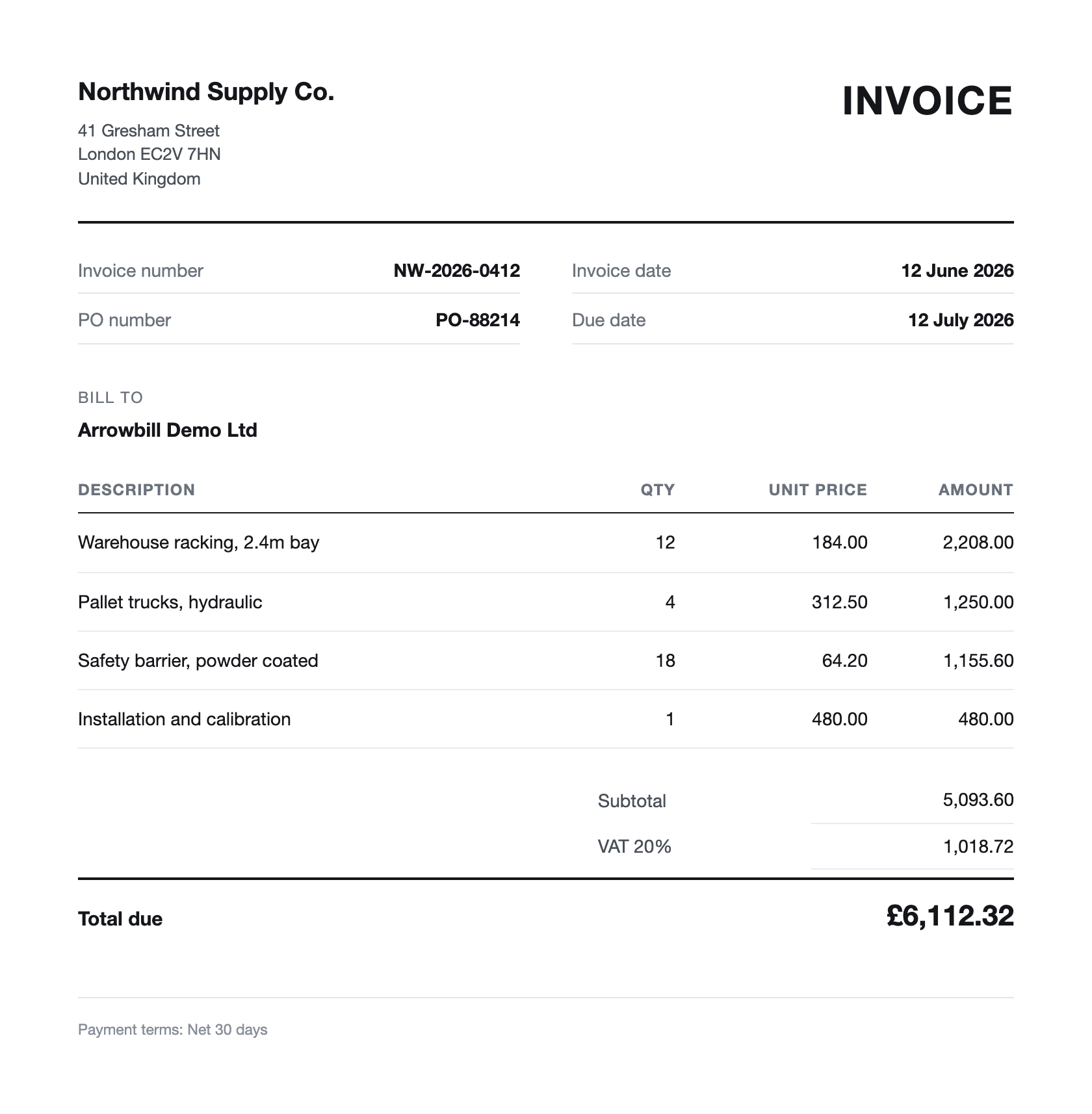
INVOICE CAPTURE
Less rekeying. More reviewing.
Extract supplier details, dates, tax and invoice lines from emailed or uploaded documents. Put your attention on the fields that need a decision.
XERO INTEGRATION
Less time processing invoices.
More control over what reaches Xero.
Capture supplier invoices, check the details and bring your team’s approvals into one workflow. Then publish reviewed draft bills to the accounts you already use.
14 days to explore · No credit card required
Our customers



ONE CONNECTED WORKFLOW
Xero is where your accounts come together. ArrowBill brings order to the work that gets them there. Explore an invoice’s journey, step by step.
Forward an email or upload a PDF or image. ArrowBill extracts the supplier, dates, tax and line items into an invoice your team can review.
MORE CLARITY. LESS CHASING.
INVOICE CAPTURE
Extract supplier details, dates, tax and invoice lines from emailed or uploaded documents. Put your attention on the fields that need a decision.
APPROVAL WORKFLOWS · TEAM
Give each invoice a defined route through your team. Keep decisions, comments and exceptions together, without giving every approver access to Xero.
TWO-WAY PO MATCHING · TEAM
Compare invoice lines with the purchase order in ArrowBill. Review quantity, value and coding differences before the bill moves into your ledger.
A CLEAR HANDOFF
Work with your Xero contacts, account codes and tax rates. Publish reviewed draft bills back to Xero, while your approval history stays in ArrowBill.
| The information | The direction | The detail |
|---|---|---|
| Contacts, account codes & tax rates | Xero → ArrowBill | Use the accounting references your team already works with. |
| Supplier, invoice reference & dates | ArrowBill → Xero | Keep the reviewed invoice identity and due date with the bill. |
| Line items, coding & tax treatment | ArrowBill → Xero | Create a draft supplier bill from the reviewed invoice data. |
| Original invoice document | ArrowBill → Xero | Upload the selected attachment after bill creation. |
| Approvals, comments & PO review | Stays in ArrowBill | Keep the decision history alongside the source invoice. |
Xero remains your accounting ledger. Payments and reconciliation continue in your existing process.
MADE FOR YOUR EXISTING SETUP
Connect the organisation you already use. Build the review process your team needs. Start with a handful of real invoices and see exactly what reaches Xero.
Connect during your free trialAuthorise the connection through Xero, then sync contacts, account codes and tax rates. Keep each ArrowBill company connected to the relevant organisation.
Choose how your team reviews and publishes invoices. On Team, configure approval routes and two-way purchase order matching.
Forward supplier emails or upload PDF and image files. Review the extracted details, complete the required checks and publish a draft bill to Xero.
THE PRACTICAL DETAILS
More about Xero invoice automation, setup and the way the two systems work together.
Talk to our teamXero AP automation handles the work before a supplier bill reaches the ledger. ArrowBill captures invoices, extracts header and line-item data, checks coding and purchase orders, routes approvals, and publishes approved bills to Xero.
An authorised user connects ArrowBill and selects the relevant Xero organisation. The connection can be disconnected without changing bills that were already published.
ArrowBill reads Xero contacts, account codes, and tax rates for invoice review. After approval, it sends the supplier bill with reviewed coding, tax treatment, and the supporting document to Xero. It does not edit existing Xero records.
Each ArrowBill company connects to one Xero organisation at a time. The Team plan supports multiple subsidiaries, allowing each company to keep its invoices, workflows, and accounting connection scoped to the relevant entity.
It may replace a separate capture tool for teams that want invoice extraction, approval routing, two-way purchase order matching, exception handling, and controlled Xero publishing in one workflow. Hubdoc, Dext, and AutoEntry offer different feature combinations and plan entitlements, so the right replacement decision depends on the work your team uses each product for today.
Connect the relevant Xero organisation, sync accounting references, set up your approval rules, and add your first few invoices. The time required depends on the complexity of your approval policies and number of entities.
Not necessarily. Your finance team can forward invoices from its existing email process to the ArrowBill inbox, or upload supported PDF and image files. Suppliers can also send invoices directly to the ArrowBill inbox when you are ready to update the delivery address.
No. Approvers review and act on invoices inside ArrowBill, so they do not need access to your Xero organisation. Their decision and comments remain attached to the invoice in the ArrowBill audit history.
ArrowBill creates draft supplier bills in Xero. Approval inside ArrowBill is a separate workflow from authorising a bill in Xero. The reviewed invoice coding and tax treatment are sent with the bill, and the selected source document is uploaded after bill creation.
Approval workflows and two-way purchase order matching are available on Team. Choose the plan that matches how your finance team reviews invoices, and see the pricing page for current inclusions and invoice allowances.
No. ArrowBill captures, reviews and publishes supplier bills. Payments and reconciliation remain in Xero or the payment service your business already uses.
ARROWBILL + XERO
Your next invoice is a good place to start.
Start your 14-day free trialNo credit card required.