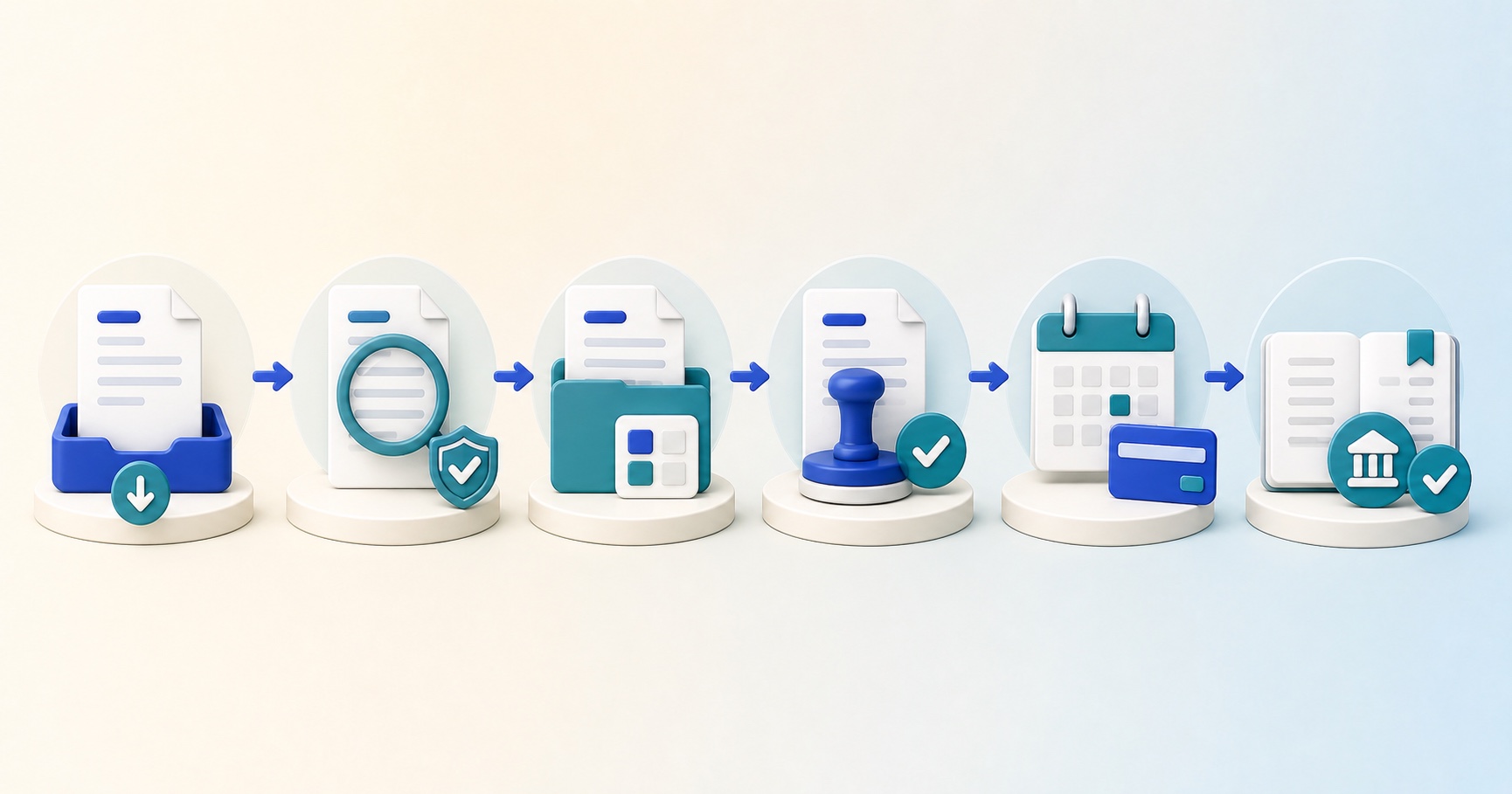
Invoice processing is the work of receiving a supplier invoice, checking that the business owes it, recording it correctly and paying it safely by the agreed due date. A complete process also shows who approved the purchase, how any differences were resolved and whether the supplier, accounting and bank records agree after payment.
The accounting entry may take seconds. The evidence around it is what protects the business. A good process makes a valid invoice easy to pay and a suspicious, duplicate or incorrect invoice difficult to pay by mistake.
Invoice processing at a glance
| When does the process start? | When the invoice reaches the business through an approved email address, portal, electronic feed or post. Record the receipt date because it helps you measure processing time and calculate when payment is due. |
|---|---|
| What should be checked? | The supplier and customer details, invoice number and dates, description, quantity, price, currency, tax, totals, payment terms and bank details. Then compare the invoice with the purchase and evidence of receipt. |
| When can it be paid? | Only after the invoice is valid, not a duplicate, matched or otherwise supported, coded correctly and approved by someone with the right authority. |
| What should stay blocked? | Possible duplicates, unexpected suppliers or bank details, missing receipt evidence, material differences, disputed amounts and invoices without the required approval. |
| When does the process finish? | After the payment is authorised, released and matched to the invoice, and the supplier, accounts payable, general ledger and bank records have been checked. |
Was it bought and received?
Connect the invoice to an approved order, contract or request and proof of delivery or service.
Who accepted the cost?
Record approval from someone who understands the purchase and has the right budget authority.
Was the right amount paid?
Use verified bank details, independent payment approval and a final check against the bank.
What to set up before the first invoice arrives
Invoice processing begins before the invoice. A small amount of preparation removes repeated questions later and helps the business pay suppliers on time.
- A controlled supplier list. Record the supplier’s legal name, tax details, normal contact and independently verified bank details. Limit who can create or change these records.
- One approved intake route. Give suppliers a dedicated invoice email address or portal. Ask colleagues to forward invoices there instead of keeping separate copies in personal inboxes.
- Clear purchase evidence. Use purchase orders where they are practical. For other purchases, keep the approved request, contract or other record that explains what was agreed.
- A coding guide. Decide which nominal account, department, project, tax code and other reporting fields apply to common purchases.
- An approval matrix. State who can approve each type and value of purchase, who covers an absence and when a second approval is required.
- A payment calendar. Work backwards from supplier due dates so approvers know when an invoice must be ready for each payment run.
The eight-step invoice process
Each step should leave a record. That record may be an original document, a system check, a comment, an approval or a bank confirmation. Together, they form the audit trail from purchase to payment.
Scroll horizontally to see every step.
Receive
Capture the original invoice and record when and how it arrived.
Validate
Check the supplier, invoice details, calculations, tax and whether the request is genuine.
Find duplicates
Compare the invoice with documents and payments already recorded.
Match and code
Connect it to the purchase and receipt, then apply the right accounting fields.
Approve
Send the invoice and any differences to the person with the right authority.
Record
Post the liability to the correct company, currency and accounting period.
Pay
Schedule the invoice, authorise the payment and send remittance advice.
Reconcile
Match the payment and compare the supplier, ledger and bank records.
Steps 1 to 3
Receive, validate and check for duplicates
1. Capture the original invoice
Save the original file or electronic record and record its arrival date. Do not process a screenshot, edited spreadsheet or pasted set of bank details when the original invoice is available. If a colleague forwards a copy, check whether the same invoice has already arrived through the normal route.
Give the invoice a clear status such as received, checking, awaiting information, awaiting approval, approved, scheduled, paid or cancelled. A status should describe what still needs to happen, not merely which folder contains the document.
2. Validate the supplier and invoice
Confirm that the supplier exists in your approved records and that the invoice is addressed to the right business. Check that the document describes something the business actually bought. In the UK, a normal commercial invoice should include a unique number, supplier and customer details, a clear description, supply and invoice dates, the amounts charged, VAT where applicable and the total owed. GOV.UK lists the invoice details businesses should include.
If you expect to recover UK VAT, check that the supplier is entitled to charge it and that the document contains the details required for the type of VAT invoice. The VAT invoice is normally the primary evidence for recovering input tax. HMRC’s VAT record-keeping notice explains the detailed requirements and exceptions.
| Check | What to compare | Stop and investigate when |
|---|---|---|
| Identity | Supplier name, address, tax registration and your legal entity. | The supplier is unknown, dormant, unexpected or uses details that do not match your records. |
| Document | Invoice number, invoice date, supply date, description and purchase reference. | The number is missing, the dates are implausible or the description does not explain the charge. |
| Amounts | Quantity, unit price, net amount, discounts, tax, gross total and currency. | The arithmetic fails, tax looks wrong or the currency differs from the agreement. |
| Payment | Agreed terms, due date and bank details already verified for the supplier. | The invoice changes bank details, asks for unusual urgency or directs payment to an unexpected country or account. |
3. Search for possible duplicates
Check more than the invoice number. Suppliers may add spaces, dashes or prefixes, resend the document as a copy, or issue the same number in a new year. Compare the supplier, normalised invoice number, invoice and supply dates, net and gross amounts, currency, purchase order and file history.
Do not delete a possible duplicate as soon as you find it. Block it, link it to the earlier invoice and record the decision. One document may be a valid instalment, credit note, corrected invoice or charge for a different legal entity. The evidence should explain why it was rejected or released.
Steps 4 to 6
Match, code, approve and record the invoice
4. Match the invoice to what was ordered and received
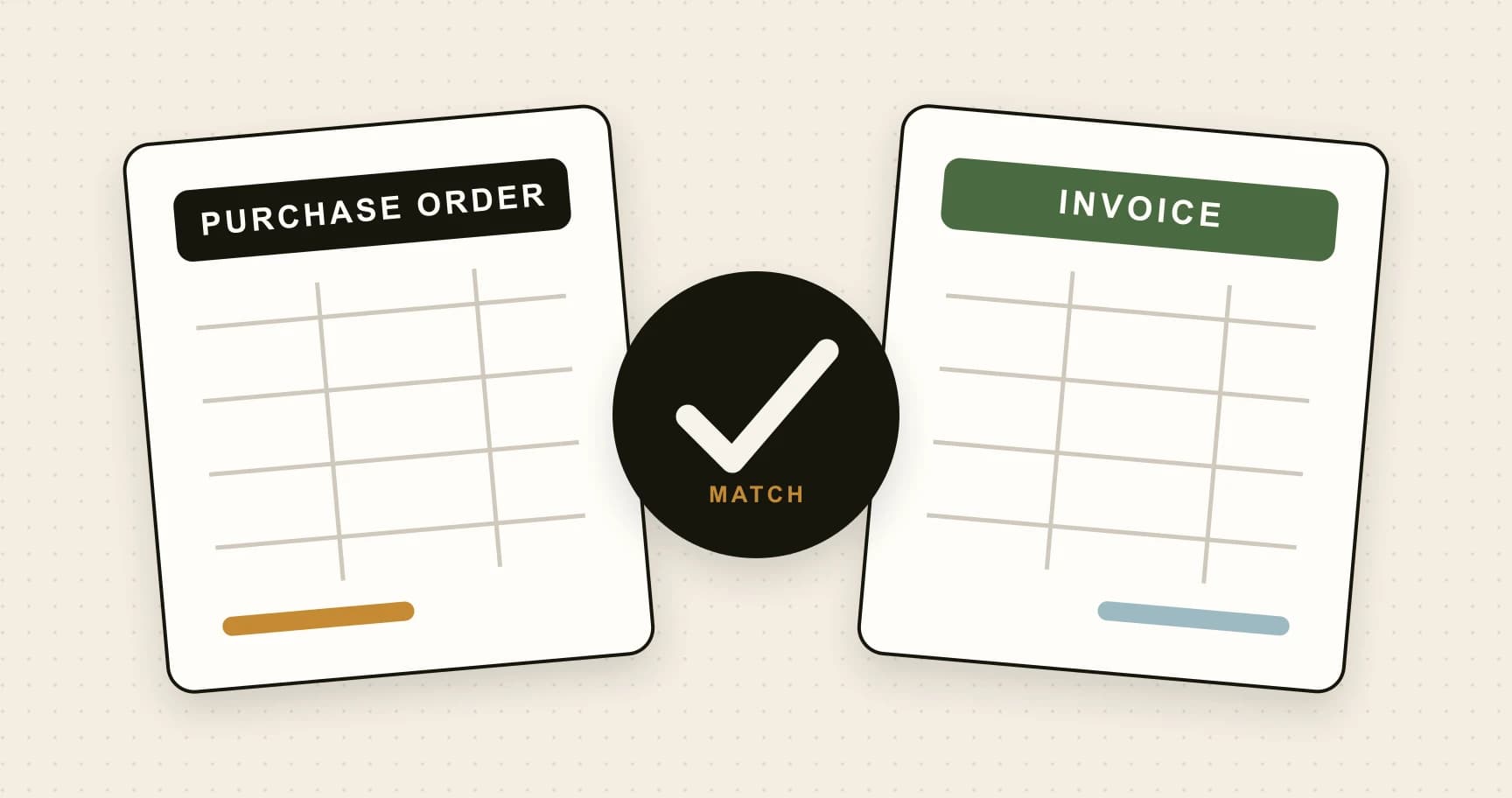
A two-way match compares the invoice with the purchase order. A three-way match also checks the goods receipt or other evidence that the supply arrived. For services, use a signed timesheet, milestone acceptance, contract owner confirmation or another reliable record of what was delivered.
Compare supplier, item or service, quantity, price, tax, currency and terms. Set written tolerances for small differences such as rounding, freight or price changes. A tolerance may allow a small difference to move forward, but it should never turn missing evidence into an approved purchase.
If there is no purchase order, use the approved request, contract and proof of delivery or service. HMRC’s procure-to-pay guidance describes the connection between the purchase order, receipt, tax invoice, credit notes, supplier payment and accounting records.
Apply the accounting codes
Code the invoice to the correct legal entity, supplier, nominal account, department, project, location and tax treatment. If the cost covers more than one period, consider whether it should be prepaid. If it creates an asset, check the business’s capitalisation policy. If the invoice arrives after month end for goods or services already received, check whether an accrual has already been recorded so the cost is not counted twice.
5. Get approval from the right person
The approver should confirm that the purchase was needed, received, priced as agreed, coded reasonably and charged to a budget they control. Approval is not a request to repeat every AP check, but it should be informed: show the invoice, purchase evidence, coding and any difference or override.
Route by value, department, type of spend, project and risk. An invoice should not be sent back to the person who submitted it merely because the real approver is unavailable. Use a recorded delegate with the right authority.
6. Record the liability
Post the approved invoice to accounts payable using the invoice date, supply date and accounting period required by your policy. Record the due date from the agreed terms, not from when someone happens to enter the document. Keep the original invoice and link the order, receipt, approval and exception notes.
Steps 7 and 8
Prepare the payment, release it and reconcile the records
7. Build and authorise the payment run
Select approved, unblocked invoices that are due. Check credit notes, disputed amounts, duplicate warnings and payments already in progress before calculating the supplier’s net payment. Review unusual values, first payments, manual additions and changes made since approval.
Use bank details from the controlled supplier record. If a supplier asks to change them, verify the request independently using a phone number or contact route you already trust. Do not use the contact information contained only in the change request. The UK National Crime Agency’s invoice fraud guidance recommends checking requests to change invoice or bank details directly with the supplier.
Separate preparation from release where practical. The person who added the supplier or changed its bank details should not be able to create, approve and release that supplier’s payment alone. Use a second bank approver for material or higher-risk payments.
Release the payment on the agreed date and send remittance advice showing which invoices and credits were settled. In the UK, an agreed date normally governs. If no payment date was agreed, statutory late-payment rules generally treat a business payment as late 30 days after the later of receiving the invoice or receiving the goods or service.
8. Match the payment and reconcile
Mark an invoice paid only when the bank instruction has been released and the outcome is known. A prepared payment file is not proof that money left the bank. Match the bank transaction to the payment batch and invoices, then investigate rejected, returned or altered payments.
Regularly compare four records: the supplier statement, the supplier account in AP, the accounts payable control account in the general ledger and the bank. Differences may reveal missing invoices, unallocated payments, unused credit notes, exchange differences, duplicates or entries posted to the wrong supplier.
A worked example from receipt to payment
A design agency receives a £6,000 software invoice
The invoice is dated 3 September and has 30-day terms. The agency pays suppliers every Thursday. Its process looks like this:
| 3 Sep | The invoice reaches the dedicated AP inbox. The original PDF and receipt time are saved. |
|---|---|
| 3 Sep | AP validates the supplier, invoice details, arithmetic, VAT and terms. A duplicate search finds no earlier document or payment. |
| 4 Sep | The invoice matches the annual order, but the service owner has not yet confirmed that the new licences were activated. The invoice is placed on hold. |
| 5 Sep | The service owner confirms activation. AP applies the software, department, prepaid expense and VAT codes. |
| 8 Sep | The budget owner approves the purchase. The invoice is posted with a due date of 3 October and the annual cost is scheduled across the service period. |
| 2 Oct | The invoice enters the Thursday payment run. A preparer checks the batch and a separate bank approver releases it using the supplier details already on file. |
| 3 Oct | The bank payment is matched to the invoice. Remittance is sent and the supplier account shows no unexplained balance. |
The process did not pay the invoice immediately, but it did make the missing receipt visible early enough to resolve it before the due date.
Keep problems visible
How to handle the most common invoice exceptions
-
Missing order
Find the person who committed the spend
Ask for the contract, approved request and proof of receipt. Do not create a purchase order after the event merely to make the invoice appear matched. Record the exception and use the escalation or retrospective approval rule in your policy.
-
Price or quantity
Separate what is agreed from what is disputed
Compare the invoice, order, receipt and contract. Ask the supplier for a corrected invoice or credit note where necessary. Keep the disputed part blocked and follow your terms and local rules when considering payment of an undisputed amount.
-
Bank change
Pause and verify outside the request
Call a known supplier contact using a number from your existing records or an independently verified source. Record who completed the check. Keep bank-detail changes separate from invoice approval and payment release.
-
Possible duplicate
Link the documents before deciding
Compare the source files, order, goods receipt, invoice history and bank. Record whether the later document is a copy, correction, instalment or separate supply. Keep one clear record of the decision instead of deleting the evidence.
-
Approval delay
Escalate before the invoice becomes late
Send reminders based on the due date and payment calendar, then route to the recorded delegate or escalation owner. Tell the supplier promptly if a genuine dispute may delay payment.
An exception queue is work, not storage. Every held invoice should have a reason, an owner, a next action and a review date. A large queue with no ownership hides late-payment and month-end risk.
Responsibility and control
No one person should control the whole payment
Divide the work so that a mistake or dishonest instruction has another chance to be found before money leaves the bank.
- BuyRequester
- Explains the business need and raises the purchase request before committing the business.
- ReceiveService owner
- Confirms that the goods arrived or the service was delivered to the required standard.
- ProcessAccounts payable
- Validates, checks for duplicates, matches, codes and records the invoice, then prepares eligible payments.
- AuthoriseApprover
- Accepts the spend within their authority. A separate bank approver releases the payment where practical.
Control points
Checks that should never disappear
Automation can perform or assist with these checks, but it should leave a result that a person can understand and review.
Document
- Control 1 of 6.
Keep the source
Retain the original invoice and arrival record, then link corrections and credit notes instead of rewriting history.
- Control 2 of 6.
Search for duplicates
Check several fields and the payment history before posting and again before releasing the payment batch.
Decision
- Control 3 of 6.
Require purchase evidence
Match the invoice with what was approved and received, or record why an alternative control was used.
- Control 4 of 6.
Enforce authority
Route by value and risk, block self-approval and record delegates instead of sharing accounts or credentials.
Money
- Control 5 of 6.
Protect bank details
Restrict changes, verify them independently and highlight changes made shortly before a payment run.
- Control 6 of 6.
Reconcile after release
Use bank evidence to confirm the outcome, then resolve rejected or unmatched items promptly.
Figures worth tracking
Measure whether invoices are accurate, controlled and ready in time. A single average can hide a small number of old, high-value or disputed invoices, so look at both percentages and the underlying queue.
- First-time match rate: the percentage that match without manual correction or missing evidence.
- Approval time: time from a complete invoice being ready for approval to the final decision.
- Exception age: the number and value of blocked invoices by reason and days outstanding.
- On-time payment: the percentage of valid, undisputed invoices paid on or before the agreed due date.
- Duplicate prevention: confirmed duplicates found before payment, plus false warnings that created unnecessary work.
- Unmatched payments: released or bank-cleared payments that are not fully allocated to supplier documents.
The UK Fair Payment Code uses clear payment-time standards: its Gold award requires at least 95% of invoices to be paid within 30 days, while Silver and Bronze apply different 30- and 60-day thresholds. You do not need to join the Code to measure payment performance, but its criteria are a useful reminder that processing should support fair supplier outcomes.
When invoice processing software can help
Email, folders and spreadsheets may be enough for a small number of simple invoices. They become harder to control when invoices arrive through several channels, approvals cross departments, coding changes by project or one invoice needs several people to resolve it.
Invoice processing software can capture the original document, extract key fields, search for duplicates, connect the invoice with orders and receipts, suggest coding and route approval. It can also keep payment blocks, record every decision and send approved bills to accounting software. The workflow should make exceptions more visible, not automatically wave them through.
How ArrowBill can help
ArrowBill helps small and growing teams collect invoices, capture their details, compare them with orders and route them for approval. It flags problems, keeps a clear record of every action and connects approved bills with accounting software.
The invoice processing checklist
Before an invoice is paid, the record should answer each of these questions without relying on someone’s memory.
Eight questions to ask about every supplier invoice
- Did the original invoice arrive through a controlled route?
- Are the supplier, document, tax and payment details valid?
- Has the business checked for duplicates?
- Does the invoice agree with what was ordered and received?
- Are the accounting and tax codes reasonable?
- Did the right person approve it with any differences visible?
- Will verified bank details and separate payment authority be used?
- Can the released payment be matched back to the invoice and bank?
If one answer is no, keep the invoice visible and blocked until the missing evidence or decision is recorded.
Frequently asked questions
What are the main steps in invoice processing?
Receive the invoice, check that it is valid, look for duplicates, match it to the purchase and code it, get approval, record it, schedule and make the payment, then reconcile the records.
How long should it take to process an invoice?
There is no single target for every business. A complete and correct invoice should move quickly enough to leave time for approval and payment by the agreed due date. Track approval time separately from time spent resolving exceptions.
What is two-way and three-way invoice matching?
A two-way match compares the invoice with the purchase order. A three-way match also checks evidence that the goods or services were received. Where there is no purchase order, use the contract, approved request and proof of delivery or service instead.
Should an invoice be approved before or after it is entered?
You can capture an invoice before approval, but it should remain blocked from payment until the required checks and approvals are complete. Your accounting policy should say when it becomes a posted liability and how unapproved items are handled at month end.
Who should approve supplier invoices?
The approver should understand the purchase, have authority for the relevant budget and be independent of the payment where practical. Higher-value or higher-risk invoices may need an additional approver.
How do you prevent duplicate invoice payments?
Use one intake route, keep the original file, search across supplier, invoice number, date, amount and currency, and block likely duplicates for review. Check again when the payment batch is prepared.
 Published guide
 Published guide
 Published guide
 Published guide